Ice Report
- 3.7
- Rating
- 50.00K
- Installs
- Free
- Price
 Analysis by App-foxy
When I head out for ice fishing, the question is rarely just whether a lake is frozen. I want to know what another person found at the access point, whether conditions changed since the last visit, and whether my own observation could save someone else a wasted trip. Ice Report is built around that narrow but useful exchange. It is a free weather app from Split Rock Software LLC, focused on sharing lake-ice information with the ice-fishing community rather than trying to replace a full forecasting service.
That focus is both its appeal and its limitation. I would not install it as my only source for a complete weather picture, and I would not treat a community report as a guarantee of safe ice. But if I regularly fish frozen lakes and want a simple way to contribute local observations or check what others have shared, this app has a clear purpose. Its store short description, “Ice Report,” is unusually direct: the whole experience is centered on ice conditions.
From a planned trip to a useful local report
The starting condition is familiar. I am preparing for a morning on the ice, perhaps checking equipment the night before, and I need information that a general weather app does not usually present in a practical way. A standard forecast can tell me about temperature, wind, snow, or precipitation. It cannot automatically tell me what the shoreline looked like after a warm afternoon, whether someone encountered slush, or whether access was becoming difficult.
You May Also Like

 Blood Strike: 2.5 Anniversary
Blood Strike’s Loadouts Turn Every Drop Into a Tactical Gamble
A close look at Blood Strike’s custom loadouts: how fast access to signature weapons reshapes its battle royale rhythm, rewards preparation, and narrows the gap between fights.

 Pandora - Music & Podcasts
Pandora’s Music Is Easy to Start, but Harder to Recover
Pandora’s strength is its low-effort path from a seed to a station. Its weak spot is how much confidence it asks you to place in connection, setup, and quiet recovery.

 8 Ball Pool
 Is Built on Rivalries, Rematches, and Routine
A close look at the rivalries, rematches, shared routines, and unanswered safety questions that turn a quick pool match into a persistent mobile community.

 Samsung Music
’s Quiet Strength Is Playing What You Already Own
Its reach comes less from spectacle than from dependable access to a personal library. That simplicity is both the app’s strongest retention engine and its ceiling.

 AccuWeather: Weather Radar
AccuWeather Review: A Quick, Clear Forecast for Everyday Decisions
For everyday plans, the best forecast is the one you can understand quickly. AccuWeather makes rain timing, radar, and local conditions easy to act on, with a few trade-offs.

 Hill Climb Racing
Why Hill Climb Racing Still Turns Crashes Into One More Run
A tiny car, a bumpy hill and one more upgrade: Hill Climb Racing keeps resurfacing because its simple chaos makes every near-miss feel personal.
More From Our News Desk
View All News


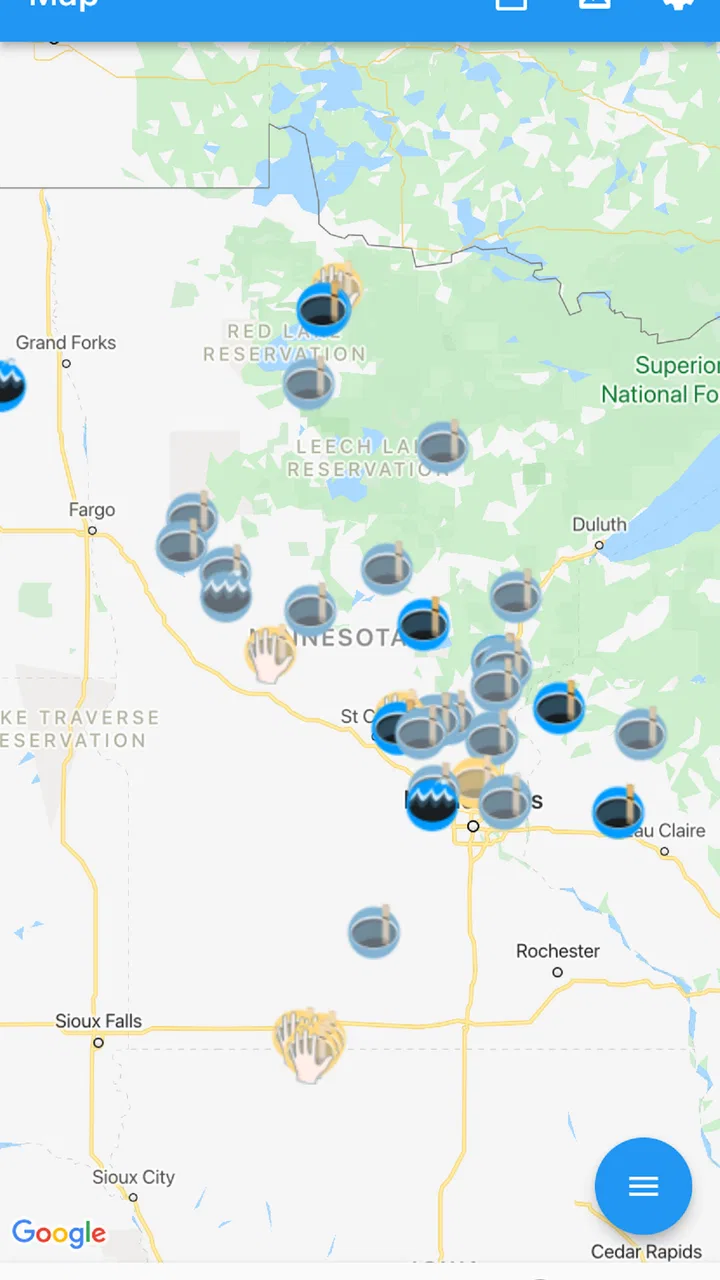
This is where the app makes sense. Instead of treating weather as an abstract forecast, it gives the ice-fishing community a place to exchange observations. The useful mindset is to see it as a local information layer: forecasts help me understand the conditions that may be developing, while shared ice reports can add context from people who were actually near the lake.
I particularly like that distinction because it prevents an easy mistake. A report is not the same thing as a safety certification. Ice can vary across one body of water, especially around inlets, outlets, vegetation, moving water, pressure cracks, and areas affected by current or changing weather. I use a community report to decide what deserves closer attention, not as permission to take a risk.
The app is available at no upfront cost and is rated for Everyone, so it is easy to try without making a purchase decision first. It has reached over 50 thousand installs, with a 3.7 average from around 170 ratings and roughly 98 written reviews. Those figures suggest a modest, specialized audience rather than a universal weather platform. That is not a problem for a niche tool, but it does mean the usefulness of the app depends heavily on whether people near the lakes I care about are participating.
What I do before relying on a report
My first step is to identify the exact lake and the timing of the information. A report from yesterday may be helpful background, but it should not be treated as a current reading after a day of rain, strong wind, or unusual temperatures. I also consider who made the observation and what they actually described. “Good” or “bad” is less useful than a clear note about access, surface conditions, slush, open water, or recent change.
This is one of the app’s important trade-offs. A community report can be more relevant than a broad regional forecast, but it may also be brief, subjective, or outdated. I get the most value when I combine it with my own checks and with ordinary weather information. The app helps narrow my attention; it does not remove the need for judgment.
For a new user, I would begin with one familiar lake rather than trying to monitor every possible destination. That makes it easier to understand how often reports appear, how detailed local contributions tend to be, and whether the information arrives early enough to affect a decision. A small, repeatable routine is more useful than opening the app once during a rushed departure.
The practical reporting flow
The central workflow is straightforward in principle: check the available information, observe conditions when you are at the lake, and share an update that another angler can understand. The value comes from completing that loop instead of only consuming reports. If everyone reads but nobody contributes, the app becomes much less useful.
When I am submitting an observation, I try to write for a person who has never met me. I would identify the lake clearly, describe the general condition I encountered, and mention anything that could change how another person approaches the trip. A short but specific note is better than a confident-sounding conclusion. The goal is not to sound authoritative; it is to pass along what I actually saw.
A non-obvious advantage of this approach is that the act of reporting forces me to separate observation from assumption. “I saw open water near the edge” is an observation. “The whole lake is unsafe” is a much broader conclusion that I may not be able to support. Keeping those separate makes the report more responsible and more useful.
I would also avoid treating the reporting screen as a personal diary. The best contribution is information that helps with a future decision: whether access appears changed, whether conditions differ from the previous visit, or whether a particular area deserves extra caution. If I only enter a vague impression, I may technically contribute while giving the next person very little to work with.
Passing information from one person to the next
The handoff is the heart of Ice Report. One angler visits a lake, records an impression, and leaves information for someone planning a later trip. That second person then has to interpret the report in context, allowing for elapsed time, weather changes, and differences between locations on the same lake.
This is where the app differs from a conventional weather service. A forecast is generally designed to provide broad, regularly updated atmospheric information. Ice Report is more like a community noticeboard for a specialized question. A weather app may be better for deciding whether a trip is comfortable or whether a storm is approaching. This app may be more relevant when the question is, “What did someone encounter at this lake?”
The handoff also creates a responsibility for the reader. I would not assume that a report applies equally to every access point. Even if two people name the same lake, they may have used different shorelines or traveled through different areas. A useful report can guide my questions, but it cannot inspect the route I intend to take.
For groups, the app can fit into a simple planning routine. One person checks recent local information, another checks the forecast and travel conditions, and the person visiting the lake later adds an updated observation. That division is practical because it prevents one source from carrying the entire decision. It also turns the app into a feedback loop instead of a one-way stream of posts.
A realistic morning with the app
Imagine I am planning a Saturday trip to a lake I have visited before. On Friday evening, I open Ice Report and look for the latest local information. I compare what I find with the broader weather outlook, paying attention to recent changes rather than simply looking for a reassuring phrase. If the report mentions difficult access or changing surface conditions, I adjust my plan by allowing more time, checking another access point, or deciding that the trip is not worth the uncertainty.
The next morning, I do not let a positive report replace an on-site assessment. I inspect the conditions for myself and remain alert to differences along the route. If I proceed, I keep the report in mind as context rather than proof. Later, I can return to the app and share what I observed, especially if conditions differ from the earlier contribution.
The outcome is not a magic “safe” or “unsafe” answer. The outcome is a better-informed starting point and a more useful record for the next angler. That may sound modest, but it is exactly the kind of narrow improvement a specialized community app can provide. It reduces uncertainty without pretending to eliminate it.
Another useful habit is to treat time as part of every handoff. I would mentally attach a date and weather context to each report, even when the app presents the information in a convenient stream. A report after a stable cold period carries a different practical meaning from one followed by rain or a sudden thaw. The app can host the observation, but I still have to interpret its age.
Where the workflow becomes frustrating
The main weakness is the same feature that makes the app distinctive: it relies on participation. If few people report on my local lakes, the app may offer less practical value than a general weather service combined with local knowledge. A community-driven tool cannot create detailed coverage on demand. Its usefulness grows where people consistently use it and shrinks where they do not.
There is also a quality-control challenge inherent in shared observations. Different users describe conditions differently, and some reports may be too short to support a confident decision. I would have preferred to see every contribution treated as one piece of evidence rather than as a definitive status. That means the app rewards careful reading, but it may frustrate anyone looking for a single clear answer.
Another point of friction is scope. Someone wanting radar, hourly forecasts, wind maps, alerts, or a broad seven-day planning tool will probably be better served by a full weather application. Ice Report is not the right choice for replacing those tools. Its strength is specialization, not breadth.
I also would not recommend it to a person who never fishes frozen lakes or who only wants everyday city weather. The narrow focus is valuable precisely because it avoids becoming another general forecast dashboard. For a casual weather user, that specialization may feel unnecessary rather than helpful.
The app is currently listed as version 2.7.1 and supports Android 7.0 or later. That makes it accessible on many older devices, which is useful if I keep a backup phone for outdoor trips. At the same time, anyone using a newer phone should still judge the experience by how smoothly it fits their own device and routine. Compatibility makes installation possible; it does not guarantee that the local reporting network will be active.
Cost, upgrades, and the decision to try it
Because the app is free to download, the sensible approach is to test it against my actual destinations before deciding whether it deserves a permanent place in my fishing routine. I would search for the lakes I visit, read several recent contributions if available, and see whether the information is specific enough to influence planning. That trial tells me more than the install count or overall rating.
Optional in-app purchases are listed at between $9.99 and $12.99 per item. I would not pay automatically just because the app is specialized. First I would establish that the core workflow—checking local information and contributing an observation—fits my needs. If an optional purchase becomes relevant, I would weigh it against the value of the local coverage and against the cost of using a broader weather service alongside it.
The rating of 3.7 feels consistent with a useful but situational tool: people who find active local reports may appreciate the focus, while people expecting a complete weather product may feel that the experience is too limited. I would read the written feedback with that distinction in mind. A complaint from someone seeking radar does not necessarily mean the app fails at community ice reporting, just as praise from a dedicated angler does not mean it replaces safety judgment.
Who should use it, and who should skip it
I think Ice Report is best for regular ice anglers, fishing groups, and people who visit the same lakes often enough to benefit from local continuity. It is especially worthwhile for someone willing to contribute after a trip. The app becomes more valuable when I am not only asking, “What can I learn?” but also, “What can I leave behind for the next person?”
It is less suitable for someone planning a one-time outing in an area with little community activity. In that situation, I may find that the app gives me too little local context, and a combination of official weather information, local authorities, experienced contacts, and direct observation will be more useful. I would also skip it as a primary tool if my main need is general forecasting rather than lake-ice information.
Most importantly, I would not use any report as a substitute for proper ice-safety practices. The app can improve communication, but it cannot measure every part of a lake for me, predict every hazard, or account for my equipment and experience. Its responsible role is to support preparation and awareness.
My final take after following the full workflow
After looking at the app as a complete process—from planning, to checking local information, to making an on-site observation, to handing that knowledge to another angler—I see a focused tool with a clear place in the right routine. Its real strength is turning isolated lake visits into shared local context. That is more specific than a normal forecast and potentially more useful for anglers who return to the same water.
My recommendation is conditional but positive. Try Ice Report if ice fishing is a regular activity and you can find an active reporting community around your destinations. Use it alongside, not instead of, weather forecasts and personal safety checks. If you want one polished app for every kind of weather information, choose a broader alternative. If you want a lightweight channel for exchanging lake-ice observations, this free app is worth testing.
The best result is not certainty. It is a better question before leaving home, a more informed plan at the access point, and a useful update after returning. For this particular audience, that focused exchange is enough to make the app worthwhile—provided I remember that every report is a helpful clue, never a promise.
FAQs for Ice Report
01What is Ice Report, and what can I use it for?
Ice Report is designed to help users access and review information related to ice conditions, reports, and safety planning. Depending on the available region and data sources, it may provide updates, location-based details, forecasts, or user-oriented reporting tools. Before relying on it for travel or outdoor activities, check which areas and features are supported in your location.
02Does Ice Report provide real-time or official ice-condition information?
The reliability and update frequency of information in Ice Report can vary according to the source, location, and reporting method used by the app. Some details may come from official organizations, while others could be community-submitted or estimated. Always confirm important conditions with local authorities and current on-site information, especially before walking, driving, fishing, or operating equipment on ice.
03Does Ice Report require an internet connection or location access?
Many of the app’s functions may require an active internet connection to load the latest reports, maps, weather information, or location-based updates. Location permission can also be useful for identifying nearby areas and displaying relevant conditions. You may be able to browse some previously loaded content offline, but you should not assume that offline information is current or complete.
04Is Ice Report free to download, and are there additional costs?
Ice Report may be available to download at no initial cost, although the exact pricing model can depend on the Android or iOS version and your region. Some features could require in-app purchases, a subscription, registration, or access to a particular service. Review the store listing and payment details before confirming a purchase, particularly if you only need basic reporting features.
05Can I rely on Ice Report for ice safety decisions?
Ice Report can be a useful planning and reference tool, but it should not be treated as a guarantee that ice is safe. Conditions may change quickly because of temperature, currents, snow, weather, and local activity. Use the app alongside official warnings, local expertise, safety equipment, and personal judgment. Never enter or cross ice solely because an app displays a favorable report.
Pros
- Quickly shows current ice conditions and weather updates.
- Useful for planning trips to lakes
- rivers
- and winter recreation areas.
- Simple interface makes key information easy to find.
- Can help users identify changing conditions before heading outdoors.
- Provides location-focused information for more informed safety decisions.
Cons
- Coverage may be limited depending on your region or local reporting sources.
- Some reports may become outdated as ice conditions change rapidly.
- Requires an internet connection to retrieve the latest updates.
- Information accuracy depends on user or authority-submitted reports.
- The app may offer limited value outside areas with seasonal ice.

Ice Report
Gallery